Archive for the ‘Reviews’ Category


DoubleMySpeed.com Alert

cyberdefenderI’ve exposed CyberDefender and their aliases before, you know: DoubleMySpeed.com, MaxMySpeed.com and MyCleanPC.com. Well, they have a new radio commercial with an appealing sounding woman touting the DoubleMySpeed.com website out here in Hawaii. But as usual, I’m sure they are mixing it up around the country with their snake oil tactics for all their aliases. I won’t rehash my previous beefs about CyberDefender today other than to say that I would steer clear of even trying their products. Below is my latest video review of DoubleMySpeed.com. Read More Here…

Read More...

How to Remove CyberDefender – aka MyCleanPC.com and DoubleMySpeed.com
CyberDefenderI have warned about CyberDefender’s “borderline scam” before under my “Reviews” category. But it seems like a good time to get out the warning again, especially since the economy has prompted so many people to try and fix their own computer problems, rather than to have them fixed by a professional. I call it a “borderline scam” because they probably do just enough to fulfill some bare-minimum, mumbo-jumbo legal requirement. First of all, MyCleanPC.com and DoubleMySpeed.com are alias websites for CyberDefender.com. These websites are all owned by the same company, which all promote the same products such as CyberDefender PC Checup, Early Detection Center, and Registry Cleaner. Read More Here…

Read More...

Internet Explorer 9 Released

Internet Explorer 9Windows Internet Explorer 9 was released today after a year or so in the making since it’s announcement. Internet Explorer 9 (IE9) boasts a long list of new and improved performance and security features. Since Microsoft has already posted a ton of information about IE9 (see various links below), I’ll just mention a few noteworthy excerpts here. But I urge you to read the next subheading “Upgrade Tips and Lessons Learned” before you blindly decide to upgrade IE on your computer so your first experience with IE9 goes smoothly. Read More Here…

Read More...

Dropbox Review

DropboxDropbox allows you to sync your files online and across your computers automatically.You can get 2GB of online storage for free, with up to 100GB available to paying customers. With Dropbox, you can Sync files of any size or type with Windows, Mac and Linux computers. Dropbox automatically syncs when new files or changes are detected. Read More Here…

Read More...

Ascentive PC Speedscan Pro Review – aka FastAtLast.com and FinallyFast.com


Ascentive is at again, they keep moving around from town to town like snake-oil salesmen selling their PC Speedscan Pro software. They actually have a whole portfolio of products, and while I haven’t reviewed each one individually, I have seen enough to know that this company is walking a thin-line between being a scam or not.


After running the FREE PC Speedscan Pro software, it will need to download additional Ascentive software to attempt to repair the issues it detected. It makes me wonder if placebos work with computers.

Their software is not completely fraudulent, as it has some level of effectiveness, but I’m sure you heard of the broken clock that was right twice a day. Anyway, it does get picked-up as a rogue infection by a very reputable anti-malware product I use everyday called Malwarebytes Anti-Malware, among others. See the screenshot below:
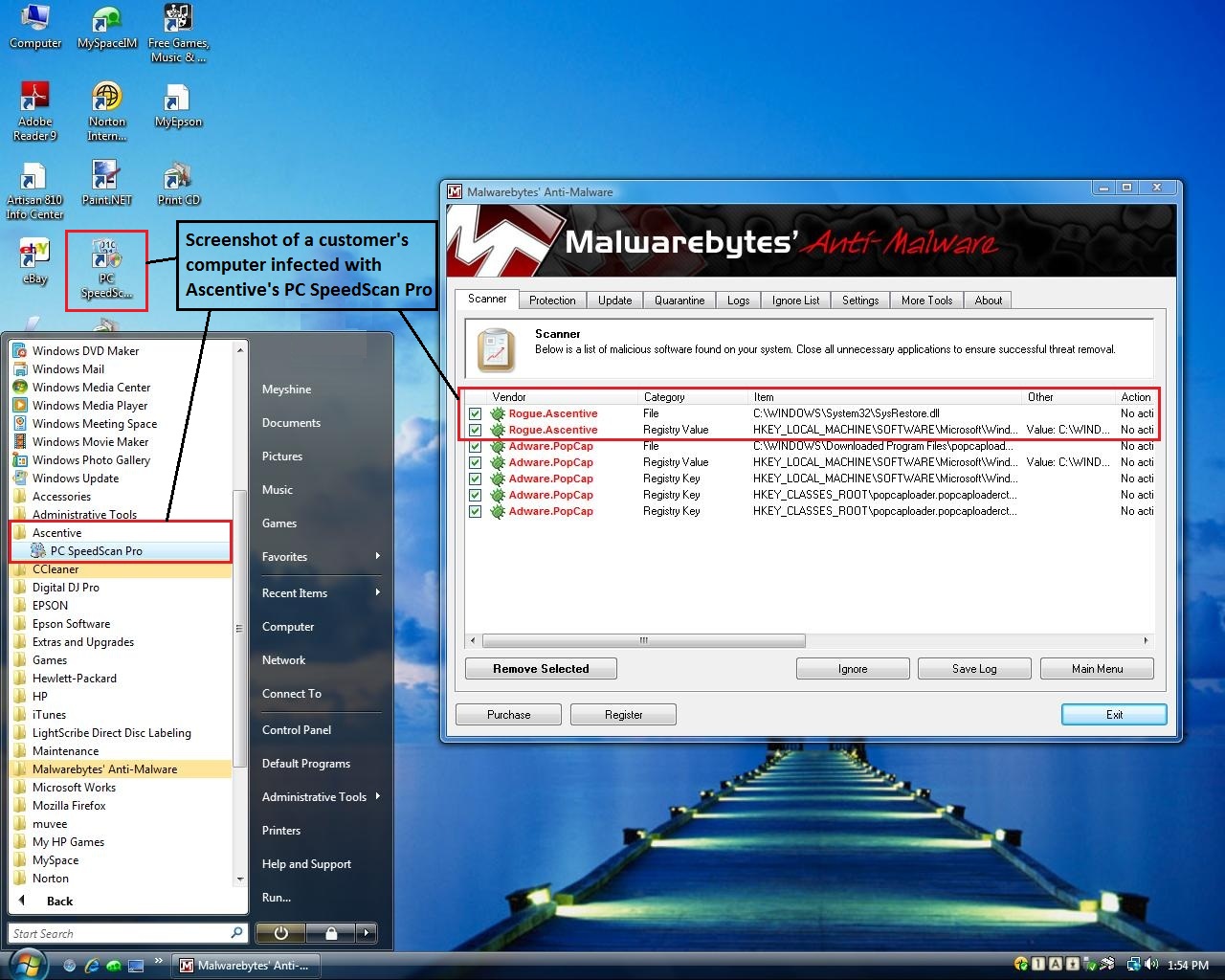
 

ascentive

(click for larger image)

I mentioned before that these guys move around like snake-oil salesmen. They also promote their products with different website names such as www.FinallyFast.com and www.FastAtLast.com.

A Few Free Alternatives to Ascentive

So if you are looking to diagnose your computer for problems, and you were looking for the free option, I would recommend the products below. Each link will take you to another page on our website with video tutorials on how to download, install and run these programs. The speeding up videos us built-in Windows tools.

ESET Nod32 Free 30 Day Trial

Malwarebytes Anti-Malware

CCleaner

Speeding Up Vista

Speeding Up XP

I have to say though that when it comes to diagnosing and repairing computer problems, that I never blindly start installing any program without first checking Windows Event Viewer logs, Antivirus history, Msconfig, Services, Minidumps, and manually browsing through the Registry and a variety of files and folders. Then I will choose what medicine to administer.

Sorry, but I can’t help you much with the technical approach unless you want to come to Hawaii and be my intern for a year or so. There are just too many basics to learn first and then the advanced stuff.

Warning When Installing Security Software

I will leave you with this tidbit, DO NOT install another Antivirus program without FIRST removing the old one. Doing so could cause you to have a new problem that could be just as bad as actually being infected, and if you are already infected, you will have a double whammy! The same goes for Firewalls and “Active” Antispyware programs, although the negative results are usually not as severe. “Active” means it is running all the time, not just when you choose to open it, and they are usually “paid” products, unless you are running a trial of a paid product.

If you feel this information has helped you, please consider making a modest donation to help keep this website going.


Read More...

How to Install and Use ESET Nod32 Antivirus Free 30 Day Trial

Down the page, you will find 4 brief videos that will show you the “meat” of downloading, installing, setting-up and using ESET’s Nod32 Antivirus on your computer. In these videos, we will be starting with the Free 30 Day Trial. Despite being a trial, it will be fully functional for 30 days, which will give you plenty of time to decide if you like it enough to switch and buy this product.

Click one of the banner images below to experience 30 Days of the Best Antivirus Product ever made. Read More Here…

Read More...

MyCleanPC.com Review

First, if you found this review from eZine Articles, I apologize for not writing about the most important findings I know about MyCleanPC, but eZine Articles will not allow you to write any negative information in articles they publish (even if it is true), so I had to tap dance around the subject, and hope the reader can read between the lines. But now that you are here, you will soon discover what I really discovered about MyCleanPC.com.

As an IT Specialist performing computer maintenance in Hawaii on a daily basis, I routinely remove viruses and malware from home and business computers. If you ask me, it seems that the problem is virtually epidemic with about 7-8 out of 10 computers we check-in for repair being infected. My point is that since we are in the business of removing malware professionally, we know what works and what doesn’t, so what is up with MyCleanPC.com? Are their sensational claims true?

MyCleanPC.com is basically a landing page to direct people to download their real product which is called CyberDefender. To be up-front and blunt, as professional PC Techs, we would “never” use software such as CyberDefender to disinfect a PC, so why would you? In fact, customers often pay us to remove CyberDefender products because of the deceptive annoyances this software employs, much like what you would find in a rogue or fake antivirus program. While CyberDefender is not an outright fake product and works to some degree, it is in no way a serious contender in the malware removal and registry cleaning software business. So how can I make this bold claim and still sleep at night?

CleanMyPC.com Review

First of all, the “real” contenders in the security software industry, such as ESET, Kaspersky, Symantec, McAfee, Trend-Micro, Zone Alarm, AVG, Computer Associates … and many more, all have their products independently certified for product compliance and performance by an accredited 3rd party company known as ICSA Labs. To this day, I have never seen any mention of CyberDefender on their product list, which you can check out for yourself on the ICSA Labs Product List. While CyberDefender boasts about receiving many awards dating back to 2006, “none”  of these awards are from the big-3 certification companies such as ICSA Labs, VB100, or AV Comparatives. It appears that the awards were for the popularity of their product which is based on the number of downloads, but this can be attributed to their aggressive TV and Radio advertising, not the actual quality or effectiveness of their products.

The folks behind MyCleanPC.com is a company called CyberDefender. It is interesting to note that Cyberdefender is also behind another website on TV and Radio called DoubleMySpeed.com which is a fraternal twin of MyCleanPC.com. And for some reason, neither of these landing page web sites lists the price you will have to pay for the actual CyberDefender products they will soon prompt you to buy. But one thing is for sure, they will not allow you to activate the additional products I call the “alleged cure” until you whip out your credit card. First they will entice you into their claws by offering a free diagnosis by prompting you to download a file currently named “InstallCyberDefenderREG-016707.exe”, but then you will have to “pay first” before you can activate the additional products that “allege” to be able to remove the threats it finds.

So why not first try one of the better known companies such as Symantec, McAfee, or Trend-Micro, etc that offers free online scanning tools as well (with some removal capability), after which you can then decide if you want to go forward and use their “free trial” software to try their full-featured product before you buy. CyberDefender only offers free scanning, it will not treat or cure anything until you buy first, which you can figure out by reading the blurb below which is an excerpt from their website about this download.

“The free download of CyberDefender Early Detection Center, Registry Cleaner and other trial product versions are intended to diagnose your computer and identify threats and/or errors that could be eliminated by the same or multiple CyberDefender products after purchase and activation. CyberDefender Early Detection Center download includes free Anti-Virus which does not require payment and will remain active as long as the software is not uninstalled. Computer performance improvements may vary depending on the software you are using and other multiple factors outside of our control.”

Notice how they say “that could be eliminated”. Virtually all the serious contenders provide instantly downloadable “free” trial versions without any limitations other than the length of the trial which usually lasts about 3o days. So why would you take a chance with an “uncertified” diagnostic-only program that you have to pay for first, when there are plenty of free trial, full-featured, certified products readily available. Also, the “real” security software companies all provide enterprise products for corporate business customers, while CyberDefender only seems to target unwary consumers. Show me one big company that consistently uses CyberDefender products and I will bow down.

The bottom line is that this company has a pattern of advertising their product for a short period of time until they get found out, then soon after they just switch to their other name. Then after a while they will start all over again. They just keep rotating their ads for the same lame CyberDefender product under different names all over the country. If their products were really that great, PC Technicians everywhere would be using, promoting and selling it themselves, and I do not know one single PC Tech who ever has. Much of the reputable software we use doesn’t cost much, and some is outright free!

The initial combination of CyberDefender products you will be prompted to purchase is affordably priced around $49.00. But they can be fairly aggressive about their backend support product called the “CyberDefender Live Help Desk” which is considerably higher. Many of the complaints we read about involve the poor performance and unreliability of their products, not to mention substandard customer service. Some just wanted to learn how to remove CyberDefender, and when a customer calls to complain, you might find yourself being asked to whip out your credit card again before they help you. This is when you may be pressured to buy the “CyberDefender Live Help Desk” product I mentioned before. Some frustrated CyberDefender customers who were reluctant to spend any more money would be left on their own. In Hawaii, many of these CyberDefender victims ultimately end up becoming our customers, so we try and educate them to avoid ever being put in this position again. I just wish the local TV and Radio Stations would do more to protect their listeners and viewers from these advertisers that over-promise and under-deliver . Checkout the Ripoff Report to read some of the complaints about CyberDefender yourself.

Conclusion

While CyberDefender is definitely ‘NOT” an outright fake security product, I firmly have reason to believe that it is surprisingly close to one. There are many reasons why a computer could be slow, and some of them can be solved very easily with no software at all with just a few Windows tweaks, something CyberDefender may actually be able to do for you, but not as if it were some miraculous program which they want you to believe. But other problems cause by severe infections is where I can assure you that CyberDefender will fail you. It is not very effective, which is probably why it has never been submitted for certification, and it is certainly not a product that could remain on the market by word of mouth alone with all the complaints. It is probably why they rely on sensational TV and Radio ads to market their product. The reality is that there are just too many similarly priced, reputable alternatives you can use than to take a chance with their product. So, in my opinion, MyCleanPC.com or DoubleMySpeed.com (whatever you know them by) which is powered by CyberDefender makes exaggerated claims about their product which doesn’t serve to help most people with their real computer problems, making CyberDefender a company to be exposed and avoided.

If you feel this information has helped you, please consider making a modest donation to help keep this website going.


Read More...

SpywareBlaster Review

SpywareBlaster is a passive internet security program from the folks at Javacool Software. With all the malicious websites just waiting like a venus flytrap for an unsuspecting internet surfer to browse by, everybody needs this program.

SpywareBlaster is primarily free, but they do offer the automatic updates option for a small fee, although there is a way to get automatic updates for free. Manual updating is very easy, but you have to remember to do it.

SpywareBlaster main page

Main Page (click for larger image)

Read More Here…

Read More...

DoubleMySpeed.com – CyberDefender Review


Many people have seen the popular DoubleMySpeed.com TV Commercial and can relate to the frustration of having a slow computer. But are the commercial’s claims true, that their software can actually double the speed of “your” computer?

Take a moment and listen to the DoubleMySpeed audio review by Dale Powell (aka the SpywarePreventionGuy) and decide for yourself.

The product they are offering is actually called CyberDefender, which you must know is NOT certified by ICSA Labs, WestCoast Labs, Virus Bulletin (VB100), or AV-Comparative virus testing and certification companies. All the major computer and internet security software companies such as Eset Nod32 (my favorite), Symantec and McAfee are all certified by these 4 companies. Their product also appears to be targeted at consumers instead of businesses. They do not offer any business enterprise security products.

You will also find out that they don’t list any prices on their www.doublemyspeed.com website, but  they usually tailor their solution with a combination of products costing about $49.00 (and this seems to vary). You can get more information from their www.cyberdefender.com website. But if you call their customer service line for help, you will find that they are very motivated in up-selling their “Live Help Desk” product for $249.00.

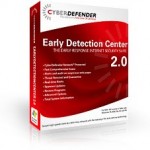
CyberDefender Early Detection Center screenshot

Many technicians will tell you that it takes several different reputable products to clean and tune-up the performance of a computer, not to mention manual procedures that only a live person can perform. Perform a search with your favorite search engine to find out actual customer experiences with CyberDefender, you will quickly develop an informed opinion on your own about whether you should purchase their software. You can also checkout the Ripoff Report to read about some CyberDefender experiences as well.

Below are some reputable alternatives to CyberDefender that I personally recommend and use regularly myself:

ESET Nod32 Antivirus:     Free 30 Day Trial

SUPERAntiSpyware:     Free 15 Day Trial

CCleaner:     Freeware (Checkout my Free CCleaner Video Tutorial)

With all the competitively priced “certified” products on the market, please do your research first before taking a chance with your computer health and internet security. It might be hard to choose what you “will” use, but it will be easy to decide what you “won’t” use. I hope this review helps you to decide.

If you feel this information has helped you, please consider making a modest donation to help keep this website going.


Read More...

CCleaner Review

CCleanerCCleaner is a totally free program you can download from the internet that you can use to remove unused files and registry entries from your computer. On computers that have not had a good disk cleanup in a while, CCleaner can actually allow Windows to run a bit faster by freeing up valuable hard disk space and removing orphaned registry entries. Below is a video demonstration about how to download, install, and run CCleaner. Read More Here…

Read More...

McAfee SiteAdvisor Review

McAfee Site Advisor – A Red, Yellow and Green Light Approach

siteadvisor-results Imagine if you just had someone there to tell you which websites were bad or not. You probably wouldn’t like someone looking over your shoulder during every click of the mouse, but there are software tools available to do most of this work for you, and one that I use everyday is actually FREE. Of course you could pay if you want the enhanced features, but the free version is quite adequate if you pay attention to the results. This tool is called SiteAdvisor from McAfee. Read More Here…

Read More...

Powered by WishList Member - Membership Site Software